######################## Standard Library Imports ##############################import pandas as pdimport osimport sys# Add the parent directory to sys.path to access 'functions.py'sys.path.append(os.path.join(os.pardir))from eda_toolkit import ensure_directory######################## Modeling Library Imports ##############################import shapimport model_tunerfrom model_tuner.pickleObjects import loadObjectsimport eda_toolkitimport matplotlib.pyplot as pltfrom core.functions import evaluate_kfold_oof, build_multimodel_performance_table, load_model_from_mlflow# Add the parent directory to sys.path to access 'functions.py'sys.path.append(os.path.join(os.pardir))print(f"This project uses: \n\n Python {sys.version.split()[0]}\n model_tuner "f"{model_tuner.__version__}\n eda_toolkit {eda_toolkit.__version__}")
/home/lshpaner/Python_Projects/circ_milan/venv_circ_311/lib/python3.11/site-packages/tqdm/auto.py:21: TqdmWarning: IProgress not found. Please update jupyter and ipywidgets. See https://ipywidgets.readthedocs.io/en/stable/user_install.html
  from .autonotebook import tqdm as notebook_tqdm
This project uses:

 Python 3.11.0
 model_tuner 0.0.34b1
 eda_toolkit 0.0.19
Set Paths & Read in the Data
# Define base paths# `base_path`` represents the parent directory of current working directorybase_path = os.path.join(os.pardir)# Go up one level from 'notebooks' to the parent directory, then into the 'data' folderdata_path = os.path.join(os.pardir, "data")image_path_png = os.path.join(base_path, "images", "png_images", "modeling")image_path_svg = os.path.join(base_path, "images", "svg_images", "modeling")# Use the function to ensure the 'data' directory existsensure_directory(data_path)ensure_directory(image_path_png)ensure_directory(image_path_svg)
# flavor (run name in MLflow) -> algo prefix used in the artifact folderFLAVORS = {"lr_smote_training": "lr","rf_smote_training": "rf","svm_orig_training": "svm",}# ----------------------------------------------------------------------# load all models# ----------------------------------------------------------------------models = { flavor: load_model_from_mlflow(flavor, algo)for flavor, algo in FLAVORS.items()}# keep the original short names working for downstream codemodel_lr = models["lr_smote_training"]model_rf = models["rf_smote_training"]model_svm = models["svm_orig_training"]
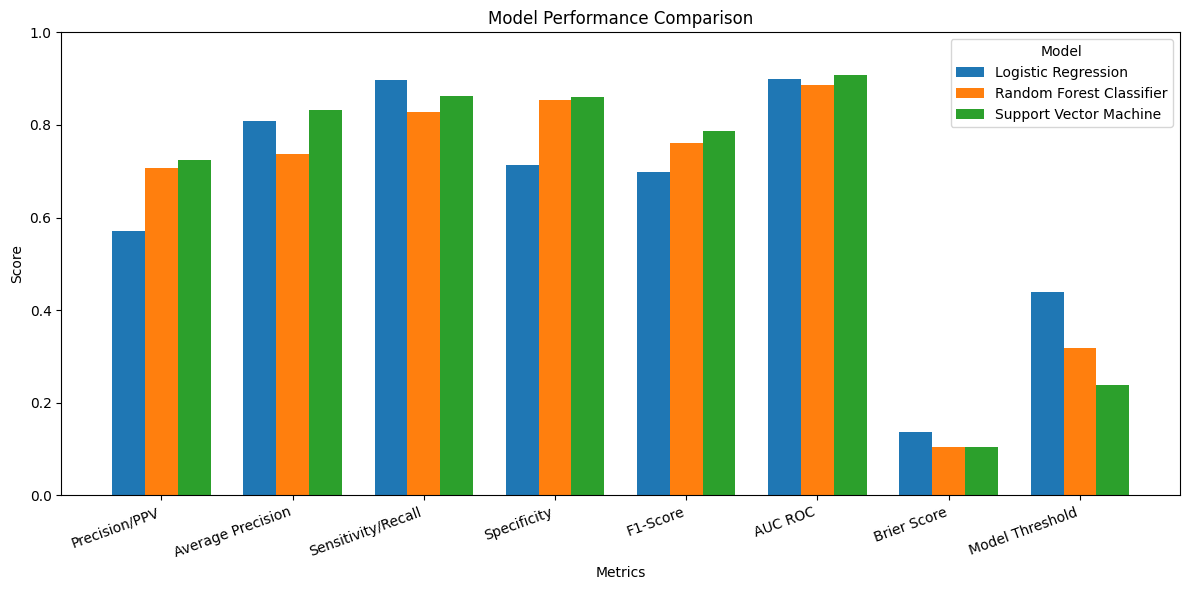
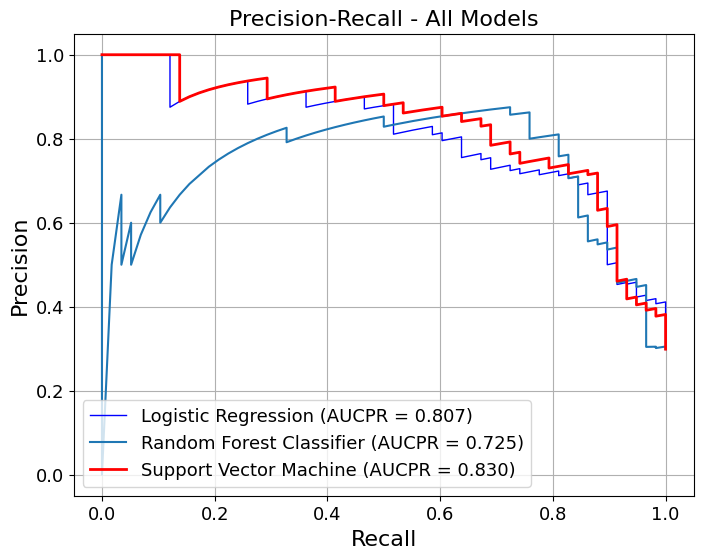
import numpy as npimport matplotlib.pyplot as pltdf_bar = table3.set_index('Metrics') # if 'Metrics' is already the index, drop this linex = np.arange(len(df_bar.index))width =0.25fig, ax = plt.subplots(figsize=(12, 6))for i, model inenumerate(df_bar.columns): ax.bar(x + (i -1) * width, df_bar[model], width, label=model)ax.set_xlabel('Metrics')ax.set_ylabel('Score')ax.set_title('Model Performance Comparison')ax.set_xticks(x)ax.set_xticklabels(df_bar.index, rotation=20, ha='right')ax.set_ylim(0, 1.0)ax.legend(title='Model', loc='upper right')plt.tight_layout()plt.savefig(os.path.join(image_path_png, "model_performance_comparison.png"), dpi=300)plt.savefig(os.path.join(image_path_svg, "model_performance_comparison.svg"))plt.show()
We first generate pooled out-of-fold (OOF) predictions using stratified K-fold cross-validation, ensuring that each observation is evaluated by a model that did not see it during training. These OOF predictions provide an unbiased estimate of generalization performance.
We then compute point estimates for each metric on the pooled OOF predictions and estimate 95% confidence intervals using a nonparametric bootstrap. Each bootstrap resample draws n observations with replacement from the OOF dataset, and metrics are recomputed on each resample. This separates model fitting (handled by CV) from uncertainty estimation (handled by bootstrapping), avoiding optimistic bias.
# Step 1: Get transformed features using model's preprocessing pipelineX_transformed = model_svm.get_preprocessing_and_feature_selection_pipeline().transform( X)# Optional: Sampling for speed (or just use X_transformed if it's small)sample_size =100X_sample = shap.utils.sample(X_transformed, sample_size, random_state=42)# Step 2: Get final fitted model (SVC in pipeline)final_model = model_svm.estimator.named_steps[model_svm.estimator_name]# Step 3: Define a pred. function that returns only the probability for class 1def model_predict(X):return final_model.predict_proba(X)[:, 1]# Step 4: Create SHAP explainerexplainer = shap.KernelExplainer( model_predict, X_sample, feature_names=model_svm.get_feature_names())# Step 5: Compute SHAP values for the full dataset or sampleshap_values = explainer.shap_values(X_sample) # can use X_transformed instead